Claude Code Can Make Videos — But Live Screen Recording Still Needs TuringShot
AI-generated animations and live tutorials are different categories. Here's why I still reach for TuringShot.
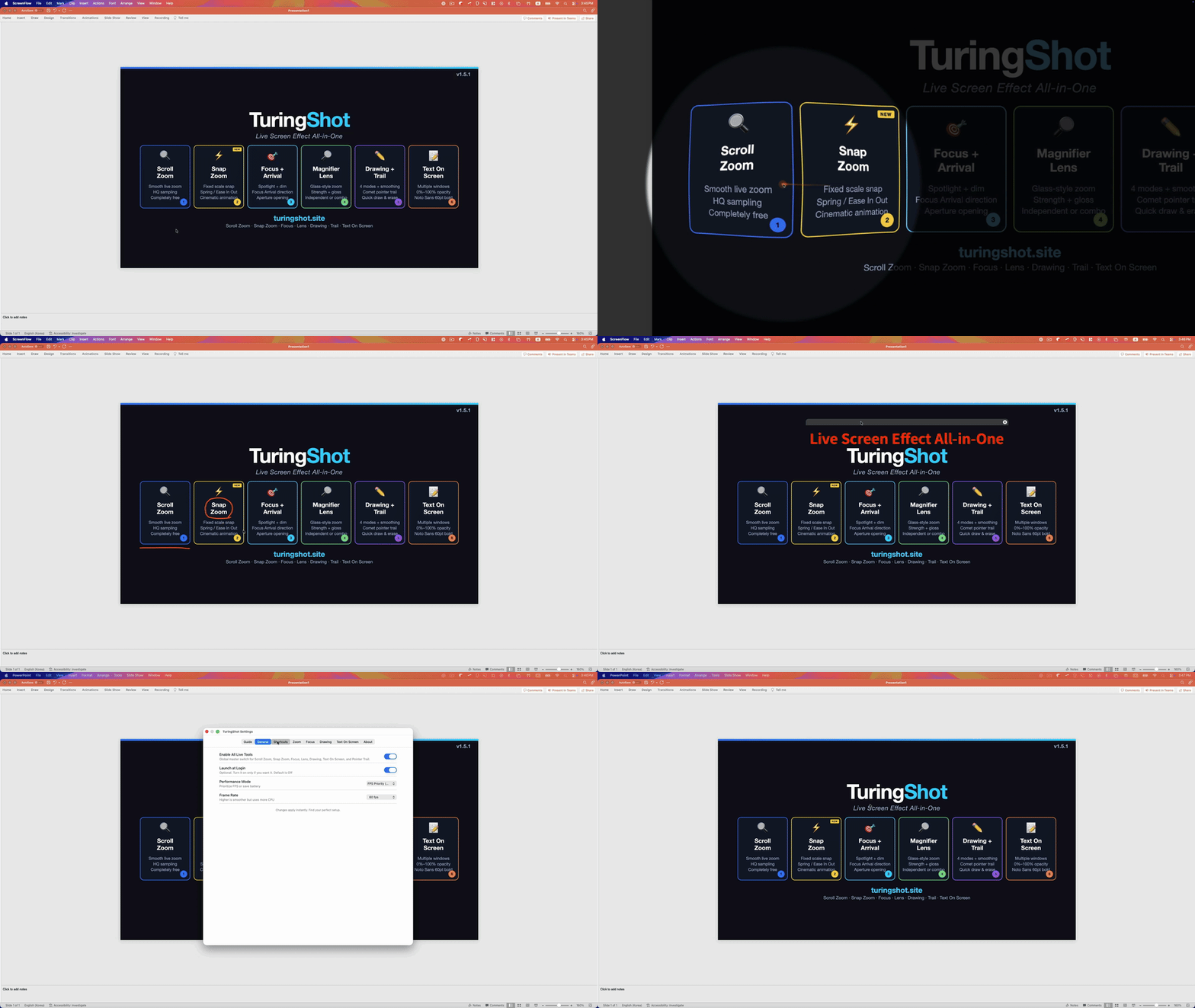
I've been using Claude Code heavily for the past year — including for video production. With one prompt, it scaffolds a Manim project, writes the scenes, renders the animation. With Remotion, it spins up an entire React-based video pipeline. So when someone recently asked me, "If AI can make videos now, why do you still need TuringShot?" — I had to think about the answer carefully.
The honest answer: they solve different problems. AI-generated video and live screen recording look superficially similar (both end up as MP4 files), but they belong to different categories of content. After a year of doing both, here's what I've learned.
What Claude Code Is Great At
If you need a video that explains a concept visually — algorithm walkthroughs, math intuition, system architecture diagrams that animate — Claude Code is genuinely transformative. I describe what I want, it writes Manim scenes, I render. A topic that would have taken a weekend of After Effects work now takes 30 minutes.
The same is true for product explainers built with Remotion. I describe the structure, Claude Code writes the React components, the timeline composes itself. The output looks polished because every frame is computed, not captured. Lighting is perfect. Timing is exact. There are no cmd+tab mishaps.
For "explanation videos that don't need a real screen" — concept animation, motion graphics, data visualizations — AI tooling has genuinely changed the workflow.
Where AI Video Falls Short
But most of what I record is a different beast: I'm using a real piece of software, on a real Mac, while explaining what I'm doing in real time. Setting up a CI pipeline. Debugging a Swift crash. Showing how a feature actually feels in a client's product. These videos have a property AI-generated video can't fake: the workflow is real.
When I record myself using Claude Code itself — the prompt-and-response rhythm, the moment a tool call fails and I pivot, the satisfying click when the test goes green — that's not a script. It's me actually doing the work. If I generated that with AI, viewers would feel the smoothness as fakeness. The texture of real interaction is the content.
And critically: when I'm actually using a tool live, I need to make my screen legible to the camera. The cursor needs to pop. The click that just happened needs to be obvious. The line of code I'm pointing at needs to be magnified. None of that is something AI can add later — because there is no "later." I'm narrating right now, and the screen has to read.
Two Different Categories
AI-Generated Video
Best for: concept animations, math/algorithm walkthroughs, motion graphics, polished product explainers.
Tools: Claude Code + Manim, Remotion, Motion Canvas.
Live Screen Recording
Best for: tutorials with narration, debugging walkthroughs, lectures, product demos, live presentations.
Tools: QuickTime / OBS for capture + TuringShot for live zoom, focus, drawing, memo.
Why Live Recording Needs Live Effects
Here's the thing nobody told me when I started recording tutorials: post-production zoom is a different deliverable than live zoom. Tools like Screen Studio and FocuSee will detect your clicks after the fact and zoom into them — and the result is gorgeous for short, scripted demos. But for a 40-minute live lecture where I'm explaining as I work, post-editing is a tax I won't pay anymore.
When I zoom live — pinch to magnify a specific UI element while my voice is tracking what I'm pointing at — the audio and the visual stay in sync because they're the same event. Nothing to align in editing. Nothing to chop. The recording is finished the moment I press stop.
That is what TuringShot does, and that's what I couldn't replicate by handing the problem to AI. I needed:
- Live zoom on whatever pixels I'm narrating about — not a post-edited zoom that the AI guessed at
- Focus highlight that follows my cursor so viewers know where to look
- A magnifier lens for tiny UI text (settings panels, terminal output) without changing my full-screen layout
- Drawing on top when I want to circle a specific argument or arrow between two functions
- Memo overlays for the small text annotation I would have added in After Effects — but now I just type it on screen and keep going
My Actual Workflow Now
Here's how I split the work today:
- Concept animations / intros / motion graphics: Claude Code → Manim or Remotion. Generated, rendered, dropped into the timeline.
- The actual lecture / debugging walkthrough / product demo: macOS screen recording (QuickTime or OBS) + TuringShot running on top for live effects.
- Final assembly: a thin edit that stitches them together. No cursor smoothing pass. No "zoom into this button" in post — it was already zoomed when I recorded.
The live recording is the part that can't be replaced by AI generation, because the value is precisely that it's me, on a real machine, narrating real work. And for that part, I need a tool that lets me make the screen legible at the moment I'm speaking. That's TuringShot's job.
A Year From Now?
I expect AI video tools to get even better at the generated category — synthetic talking-head tutorials, AI cursor smoothing, automated zoom. They'll absorb more and more of the "polished post-production" deliverable.
But the deliverable I care about most — real human narrating real work on a real machine — gets more valuable as the rest gets synthetic. Trust scales with authenticity. And to make that authentic recording readable, you still need live screen effects. Pinch to zoom. Highlight where I'm pointing. Draw on top. Type a memo. Then keep talking.
That's why I still build TuringShot.
Try TuringShot — Free screen zoom, premium effects from $2.99/year
Download on Mac App Store